
01 / 09
Scenario-based decisions
Compare alternative budgets on DCF, payback, risk and strategic fit before committing capital.
Weissr Capex Platform · Weissr Capital Budgeting
Reconcile strategic direction with investment demand, compare budget scenarios and preserve every allocation decision in one auditable system.
ISO 27001 certifiedSAP & Oracle integration1,000+ production sites globally

Capital Budgeting: Trusted by



Why it matters
Capital Budgeting sits between Capex Strategy and Capex Management, turning strategic direction into funded commitments. Capital Budgeting is an add-on to Capex Management.
Compare alternative budgets on DCF, payback, risk and strategic fit before committing capital.
Reconcile strategic envelopes with site demand inside explicit, visible scenarios.
Move capital through governed pools and organisational levels instead of transferring it informally between projects.
Approve one scenario and preserve the numbers, conditions and rationale exactly as sanctioned.
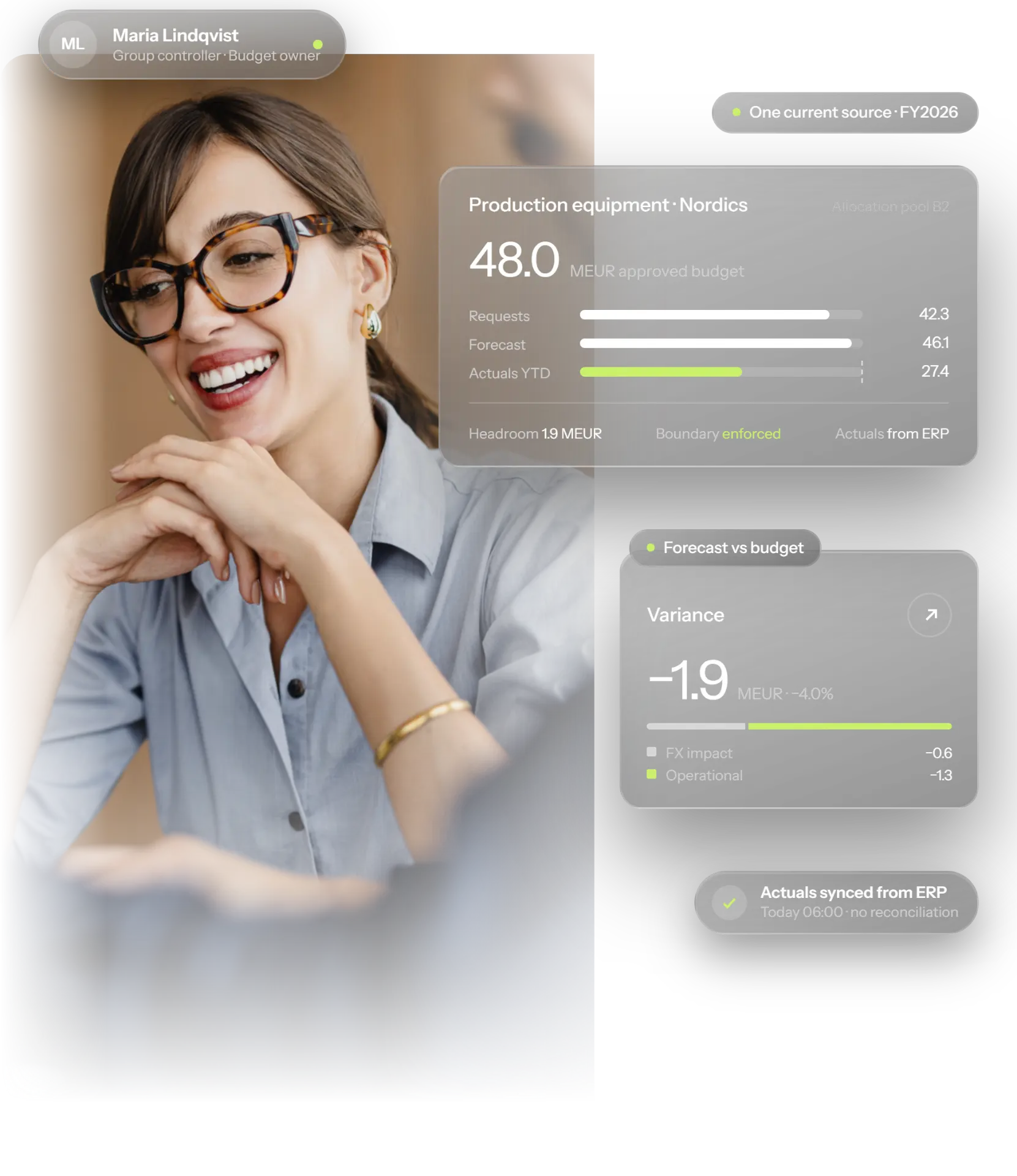
Track steering targets, approved amounts, forecasts and actuals as distinct data series.
Approve the lifetime envelope once, phase it across cycles and reapprove only material changes.
Budget capex and opex together or separately, so decisions reflect the full lifecycle cost of every asset.
Run annual, rolling and multi-year cycles, with historical FX rates preserved at approval.
Connect SAP, Microsoft Dynamics 365, IBM Maximo, Infor EAM and other systems. Actuals flow in automatically.
“It’s a one-stop flow. Once you’re in, everything just runs.”
How it works
Investment requirements, asset priorities and organisational envelopes flow from Capex Strategy, giving finance a structured baseline rather than a blank spreadsheet.
Set boundaries at Group, Division, Business Area and Business Unit level, funded through Capital Allocation Pools at the appropriate organisational level.
Compare requests from Capex Management against strategic fit, DCF, payback and risk. Portfolio-level trade-offs stay visible before decisions are made.
Hierarchical approvals preserve the chosen scenario, conditions and rationale. Multi-year investments retain their lifetime envelope across annual cycles.
Project teams see the exact sanctioned amount, conditions and history in Capex Management without re-entry or a manual handover.
ERP actuals update automatically, FX effects remain separate from operational performance, and event-driven alerts flag overruns and deadlines.
What changes
1
Approved scenario, frozen as a snapshot
100%
Audit trail on every allocation decision
Group → BU
Allocation pools at every level
Explore the platform
Blog
Learn more about how strategy, planning, budgeting and execution connect.
Explore
Define long-term direction and investment priorities.
Explore
Execute approved investments and learn from outcomes.
Explore by capability
Rank competing requests before the budget is set.
Explore by capability
Release funded budget through delegated authority.
Explore by capability
Report budget, actuals and forecast in one portfolio view.
Connected
Bring ERP, EAM and reporting data into the loop.
Explore by challenge
Rank competing investments against strategy and capital limits.
Explore by challenge
Keep budget, forecast and actuals in one governed view.
Customer stories

After more than quadrupling in size, a specialty petrochemical company used Weissr Capex Management to establish one consistent Capex process across countries, sites and newly acquired businesses.
to go live
growth in company size

“The most significant impact has been the time savings realized from eliminating manual processes.”
Van Tran
Director of FP&A
saved every month


“Now we do it the same way every time. We have one model, and we use it regardless of the investment.”
Anders Nordmark
EVP Supply Chain and Technology
investment model used for every investment
Capex Maturity Assessment
Answer a short set of questions on process, data, visibility and cash flow, and get a report showing your level in each area.
Take the assessmentCapital Budgeting FAQ
Capital budgeting software helps finance teams decide which capital investments to fund in a budget cycle. Weissr Capital Budgeting reconciles top-down strategy with bottom-up investment demand, compares budget scenarios, governs allocation through capital allocation pools at every organisational level, and preserves the approved scenario as an immutable snapshot with a full audit trail.
ERP systems such as SAP are built for financial record-keeping and reporting. Weissr Capital Budgeting complements the ERP by focusing on the capital budgeting process: evaluating and prioritising investment requests inside budget scenarios, allocating funding through pools, approving budgets, and tracking budget, forecast and actuals in one place.
Yes. Weissr Capital Budgeting connects directly to SAP, Microsoft Dynamics 365 and other ERP systems, and pulls in actuals automatically, so budget data stays synchronised without manual entry.
Yes. Weissr Capital Budgeting connects to EAM systems such as IBM Maximo and Infor EAM and pulls in the asset register and asset condition data. Finance and operations teams then share one view of the asset base when they make investment decisions.
Yes. Capex and opex can be budgeted and evaluated together using lifecycle economics, so decisions reflect the full long-term cost of every asset and not only the upfront spend. The opex covered is the opex linked to the investments, such as running costs, maintenance and energy. It is not the company’s general operating budget.
Yes. A multi-year investment is approved once with a lifetime envelope, phased across budget cycles. Each annual cycle confirms that year’s phase instead of approving the business case again. Variance is tracked against both the annual phase and the lifetime envelope, so an investment that is on plan for the year but drifting on its total commitment is flagged.
Weissr Capital Budgeting is designed for capital-intensive organisations with significant annual capex across multiple sites, typically from about $10M a year. It fits organisations that still rely on spreadsheets or disconnected tools and need a structured, shared process for budgeting capital investments.
Yes. Approval workflows, budget structures and financial criteria are configurable, so the platform follows how the organisation already works and does not require the process to change.
Implementation typically takes between 1 and 4 months, depending on the size and complexity of the organisation. The onboarding team configures workflows, forms and integrations around the existing process, which keeps disruption low and time to value short.
See how Weissr can fit your existing cycle, hierarchy and approval model.
Book a demo