
15 min read
Cash Flow Model
The cash flow model is where you calculate how a strategic initiative affects the future cash flow of your organization. Each alternative has its own model, so you can compare the Base Alternative with Strategic Building Blocks and Strategic Alternatives and see which one creates the most value.
This page describes how you work in the cash flow model: where you find it, what it looks like, how cells behave when you edit them, and what each action in the right-click menu does.
Finding the cash flow model
The cash flow model belongs to an alternative. Open the Base Alternative, a Strategic Building Block or a Strategic Alternative, and you find the model on three tabs. All three tabs use the same spreadsheet grid and work the same way.
Tab | What it holds | Permission needed to edit |
|---|---|---|
Cash Flow | The model sheets for each node in the organizational structure: the calculations that produce the cash flow of the alternative. | Model, with update rights on the selected node |
Cash Flow Settings | The assumptions the model uses, such as exchange rates and other project-wide parameters. The node tree is not shown on this tab. | Model Assumptions, with update rights. Read rights are needed to open the tab. |
External Data | Data that comes from outside the model and feeds into it. Available on division level or lower. On a higher node the tab shows "External Data is available on division level or lower". | External Data, with update rights on the selected node |
🔧 Configuration: Your administrator assigns these permissions to user groups. Model and External Data apply per node in the organizational structure. Model Assumptions applies to the whole application.
🔧 Configuration: Your administrator decides which external data rows exist for each node. If nothing is set up for the node you select, the External Data tab shows an empty grid.
👉 Learn more about permissions
Moving between nodes and alternatives
Use the tree on the left to move through the model. Click a node and the grid loads the model sheet for that node and scrolls to it. Higher nodes in the tree normally show more aggregated figures. To see the same sheet for another alternative, open that alternative and go to the same tab.
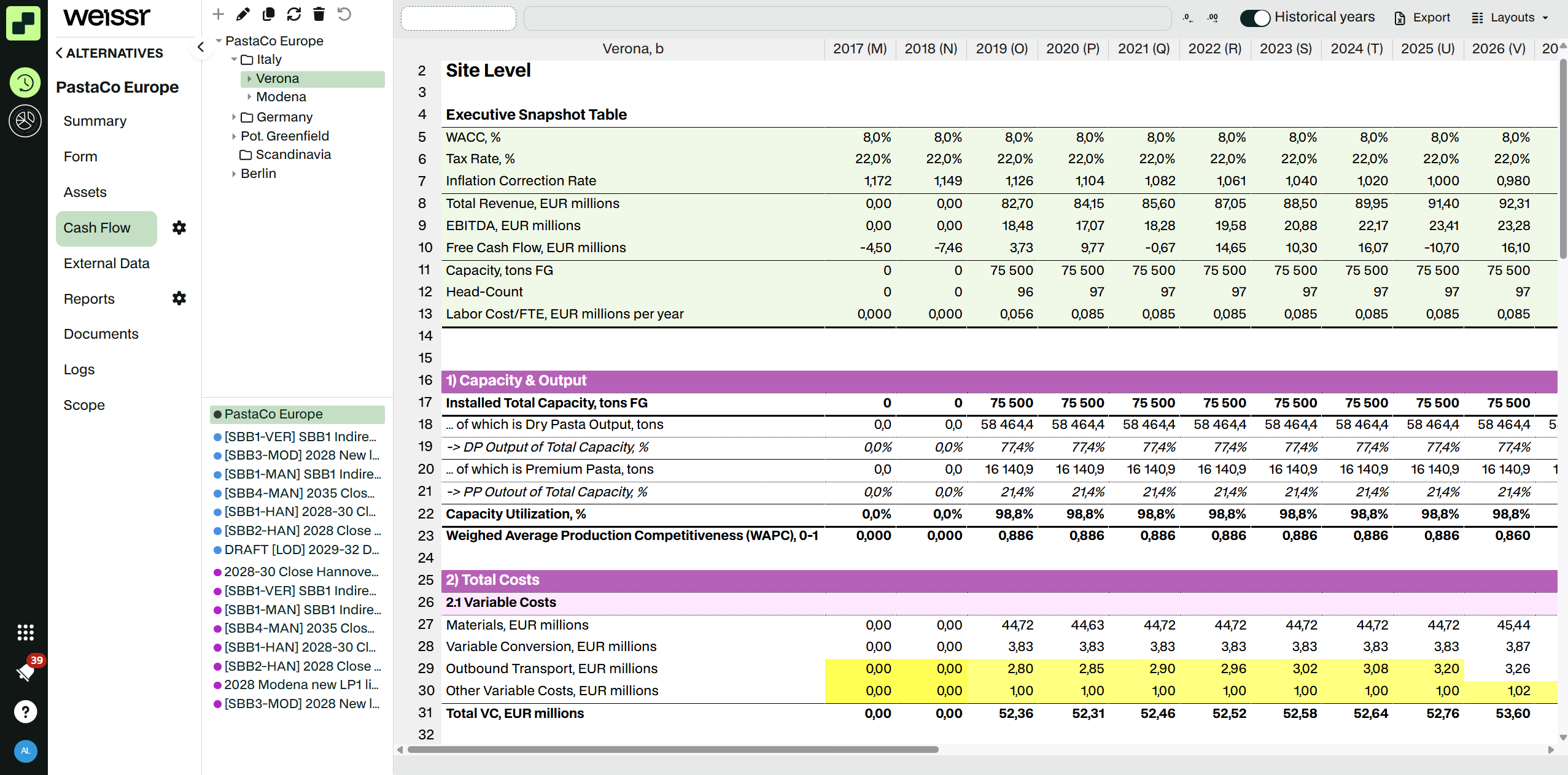 Cash flow tab with a site level sheet.
The cash flow grid
The cash flow model looks and works much like an Excel sheet. Each row is a line in the model, and each column is one year.
The bar above the grid
From left to right, the bar above the grid contains:
Cell address: the address of the selected cell, for example
M5.Formula bar: shows the formula or value of the selected cell. You can edit the cell here as well as in the grid.
Number of decimals: two buttons that decrease or increase the decimals shown in the selected cells.
Toolbar: the Historical years toggle, Layouts and, on the Cash Flow tab, Export. See Toolbar actions.
📌 Note: The decimals buttons only change how many decimals you see in your browser. The change is not saved and does not affect the stored values.
Columns and years
The first column holds the row captions. It stays in place when you scroll sideways.
After the caption column comes one column per year, from the first to the last year of the project. The model works in whole years only. There are no month or quarter columns and no totals column.
Column headers show the year and the column letter, for example 2025 (M). You use the letter when you write cell references in formulas.
On the Cash Flow and External Data tabs, the caption column header shows which node you are looking at as you scroll, in the form "Node or material, Mill, alternative short name".
You can drag a column edge to change its width.
To make the grid larger or smaller, use the zoom in your browser, for example Ctrl and the mouse wheel. The grid has no zoom setting of its own.
The years are divided into four periods (historical, forecast, trend and the period after), set in the project settings. The model can use a different formula in each period.
👉 Learn more about project settings and periods
Rows and sections
Rows are numbered from 1. Row 1 is an empty system row that you cannot edit. The model starts on row 2.
Rows can be grouped into sections. Click the plus or minus button next to a section row to expand or collapse it. The grid remembers which sections you have open when the data reloads.
Rows can be hidden. A marker in the row header shows where hidden rows are. See Right-click actions for how to hide and unhide rows.
If you do not have read access to a row, the row is grey and shows "N/A".
Cell formatting
The model builder decides how each row looks: background and font color, font size, bold, italic, underline, alignment, top border and number format. Percentage rows are shown as percent. Other numbers follow the decimal separator in your regional settings. You cannot change this formatting in the grid.
Cell colors
On top of the model formatting, Weissr colors cells to show where manual input has been made and where something is wrong.
Color | Meaning |
|---|---|
Light yellow | A value or formula entered in the Base Alternative, in a row that expects manual input. |
Orange | A value or formula entered in the Base Alternative that overrides a model formula. Orange is only used in the Base Alternative. |
Cyan | A value or formula entered in a Strategic Building Block, whether the row expects manual input or the input overrides a model formula. |
Green | A value or formula entered in a Strategic Alternative, whether the row expects manual input or the input overrides a model formula. |
Red | The cell has an error, for example a calculation error. The whole cell background turns red. |
Light red | The cell is part of a circular reference. |
Grey | You do not have read access to the row. The caption and cells show "N/A". A cell can also turn grey for a moment while Weissr recalculates it. |
If a cell has more than one of these states, error wins over circular reference, and circular reference wins over the input colors.
💡 Tip: The color tells you where the input came from. When you open a Strategic Alternative, a light yellow or orange cell shows a value inherited from the Base Alternative, and a cyan cell shows a value inherited from one of its Strategic Building Blocks. A green cell shows a value entered in the Strategic Alternative itself. Input in the Strategic Alternative overrides input from its building blocks and the Base Alternative.
Other markers in the grid
Comment: a small triangle in the corner of the cell. Hover over the cell to read it.
Comments from other alternatives: a corner marker. Hover over the cell to see each comment with the name of the alternative it was written in.
Goal seek cells: cells that can be used as a goal have a dashed border. When you select one, the cell that goal seek will change gets a thicker dashed border.
Blank cells: a cell is blank when its value was deleted, when the asset is retired, or when the row has no formula for that year.
Status bar
When you select more than one cell, the bar under the grid shows the Average, Count and Sum of the selection.
 Selected cells with the Average, Count and Sum in the status bar under the grid.
Editing cells
Entering a value or formula
Select the cell.
Start typing, press F2 or double-click the cell. You can also click in the formula bar.
Type a number, or a formula that starts with
=. In percentage rows you can type values such as5%.Press Enter to confirm and move down, or Tab to confirm and move right. Press Esc to cancel.
Formulas use Excel syntax and A1 cell references. If you type something that is not valid, the value is rejected and you see the message "Validation failed".
📌 Note: Pressing Enter on a selected cell does not start editing. Type directly, press F2 or double-click.
Changing an existing formula
When a cell holds a formula, you can change it or replace it.
To add to the formula, press F2, double-click the cell or click in the formula bar. The existing formula opens, for example
=D71/D36*1000, and you can add to it, for example=D71/D36*1000+65.To replace the formula, select the cell and start typing. What you type replaces the formula.
⚠️ Warning: Weissr does not ask you to confirm before you replace a model formula. The cell then stops following the model and shows an input color. To go back to the model formula, right-click the cell and choose Reset cells.
Referring to other cells
While you write a formula, type an operator such as =, + or ( and then click a cell or drag over a range. Weissr inserts the reference for you. Each reference in the formula gets its own color, and the referenced cells get a border in the same color, so you can see what the formula uses.
Saving and recalculation
Every change is saved as soon as you confirm it. There is no Save button. Weissr then recalculates the model and updates the affected cells in the grid. If you are editing a cell while the results come in, the grid waits until you have finished.
If the calculation fails for a cell you changed, you see the message "Input error".
If saving fails, you see an error message and the sheet reloads.
⚠️ Warning: There is no undo in the cash flow model. To go back to an earlier value, use Cell logs... in the right-click menu, or Reset cells to go back to the model formula.
Copying and pasting
Within the grid: copy with Ctrl+C and paste with Ctrl+V. Values and formulas are copied the way Excel does it, so relative references move with the paste. If you copy one cell and paste it over a range, the whole range gets the formula.
From Excel or another program: paste with Ctrl+V. Weissr pastes the numbers as they are shown in Excel. A pasted value that starts with
=is saved as a formula.Cut and drag-to-fill are not available.
When you paste a block of cells, the paste starts in the top-left cell of your selection.
If you select a larger area than you copied, the copied block repeats to fill the selection.
If you select a smaller area, or a single cell, the paste fills as many cells as you copied, even beyond your selection.
💡 Tip: Excel pastes the numbers as it displays them. Increase the number of decimals in Excel before you copy, so you do not lose precision.
📌 Note: Use a comma or a full stop as the decimal separator, and leave out thousands separators. A value such as
1 234,5is rejected as invalid, and1,234is read as 1.234, not 1234.
Keyboard shortcuts
Key | What it does |
|---|---|
Arrow keys | Move between cells |
Enter | Confirm the edit and move down |
Shift+Enter | Confirm the edit and move up |
Tab | Move right. While you edit, it also confirms the edit. |
Shift+Tab | Move left. While you edit, it also confirms the edit. |
Ctrl+Enter | Confirm the edit and write the same value into every selected cell |
F2 or double-click | Edit the selected cell |
Esc | Cancel the edit |
Delete or Backspace | Delete the values in the selected cells (same as Delete values) |
Ctrl+C, Ctrl+V | Copy and paste |
Read-only cells and models
The whole grid is read-only when:
you do not have update rights for the tab on the selected node, or
the project is locked.
Single cells are read-only when:
the model builder has made the row read-only, or it is a text row,
the year is outside the periods your model view lets you edit, or
the asset is retired. The cell is then also blank.
The caption column can never be edited.
Right-click actions
Right-click a cell or a selection to open the context menu. Which items you see depends on your permissions, and which items you can click depends on what you have selected.
Cash Flow tab
Action | What it does | Available when |
|---|---|---|
Copy | Copies the selected cells. | One range is selected. |
Hide rows | Hides the selected rows. Hidden rows stay hidden the next time you open the model. | No layout is applied. |
Unhide rows | Shows the hidden rows inside your selection. Select the rows above and below the hidden ones. | The selection includes a hidden row and no layout is applied. |
Unhide all rows | Shows all hidden rows on the sheet. | The sheet has hidden rows and no layout is applied. |
Add comment | Opens a comment box on the cell. The comment is saved when you close the box. Comments belong to the alternative you write them in. | One editable number cell is selected. |
Delete comment | Deletes the comments in the selected cells. | At least one selected cell has a comment and all selected cells are editable. |
Link to Base Alternative | Replaces each selected cell with a reference to the same cell in the Base Alternative, so the cell follows the Base Alternative from now on. | Only shown in Strategic Building Blocks and Strategic Alternatives. |
Goal seek | Opens the Goal seek dialog. See Goal seek. | One cell with a formula is selected. |
Delete values | Deletes the values in the selected cells and leaves them blank. | Any selection of year cells. |
Delete values to row end | Deletes the value in the selected cell and in every later year of the row. | One cell is selected. |
Copy to end | Copies the value or formula of the selected cell to every later year in the same row, up to the last year of the model. References move the way they do in Excel. It never copies to other rows. | One cell is selected. |
Copy to period end | Copies the value or formula of the selected cell to every later year in the same row and period. | One cell is selected. |
Reset cells | Removes manual input from the selected cells, so they go back to the model formula and default color. | Any selection of year cells. |
Cell logs... | Opens the history of the cell. See Cell logs. | One cell is selected. Also available when the grid is read-only. |
Refresh | Reloads the sheet. | Always. |
Cash Flow Settings and External Data tabs
Cash Flow Settings has the same menu without Hide rows, Unhide rows and Unhide all rows.
External Data has the same menu, including Link to Base Alternative in Strategic Building Blocks and Strategic Alternatives. NEW IN 5.3.7
🔒 If you cannot edit the grid, because you lack update rights or the project is locked, the menu only shows Copy, Cell logs... and Refresh. A selection that includes row 1 also disables the editing actions.
📌 Note: On the Cash Flow Settings tab, you cannot reset exchange-rate rows when the project uses global exchange rates.
💡 Tip: Link to Base Alternative links cells in one alternative. To compare a row with the Base Alternative in every alternative, define it once with the BASE function in the model builder.
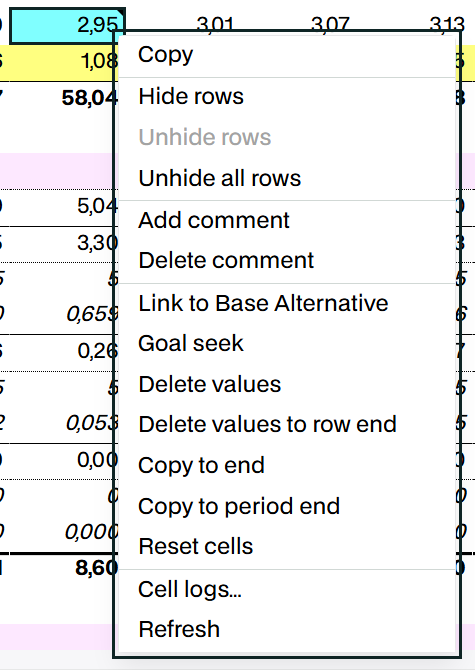 The right-click menu on a cell in the Cash Flow tab.
Goal seek
Goal seek finds the input value that makes a result reach a target, in the same way as Goal Seek in Excel. The model builder decides which cells can be used as goals and which cell is changed.
Right-click a cell with a formula and choose Goal seek.
Set cell shows the cell you selected.
In To value, enter the value you want the cell to reach.
In By changing cell, enter the address of the cell Weissr should change, for example
P12.Click Calculate. Weissr shows the value it found for the changing cell and the result.
Click Apply to write the value into the model, or Cancel to leave the model as it was.
Cell logs
Cell logs show every earlier value and formula of a cell, with the user who entered it and the date.
Right-click the cell and choose Cell logs....
The Logs dialog lists each change with User, Date and Old value.
To bring back an earlier value, click Insert on that row. Insert is only shown if you can edit the cell.
Toolbar actions
Historical years
Turn off Historical years to hide the years before the current year of the project, so you only see the forecast. Weissr remembers your choice. It is on by default.
Layouts
A layout shows only a chosen set of rows. Open Layouts to create, apply, edit or delete a layout, or click Reset to go back to all rows. A badge on the button shows when a layout is applied. While a layout is applied, you cannot hide or unhide rows.
👉 Learn more about cash flow model layouts
Export
On the Cash Flow tab, Export exports the model to Excel. You choose the nodes, whether to include sensitivity, and which layout to use for each sheet.
👉 Learn more about exporting the cash flow model
Model setup
You work in the model, but its structure is defined by the model builder and your administrators:
Model building defines the rows, their formulas per period, formatting, and which rows are read-only or text rows.
Model views in the Administration console decide which users can edit which periods, and which rows goal seek uses.
Project settings set the period years, the current year, exchange rates and whether sensitivity is used.
👉 Learn more about model building
In this section
Cash Flow Model layouts
Cash Flow Model layouts Cash flow model layouts are a powerful feature designed to streamline your analysis by acting as a filter on the rows within the cash flow model. They enable you to focus on sp
Export of Cash Flow Model
Export of Cash Flow Model Exporting Cash Flow Models is an essential activity in Capex Strategy. When exporting a Cash Flow Model, the system displays a pre-export dialog that contains all export opti